Does Snapchat Notify When You Screenshot or View a Story?
TapDownload is a free website that saves public Snapchat Spotlight videos, stories and highlights from their link. It is not affiliated with Snap Inc.
Inside the app, yes: the owner's viewer list shows who watched their story, and Snapchat says it also shows whether a screenshot was taken. Opening a public story on the web without logging in, for example in TapDownload, attaches no account, so your name can't appear in that list.
The short answer
| You… | Can they tell? |
|---|---|
| watch a friend's story in the app | Yes. Your name is in their viewer list. |
| screenshot a friend's story in the app | Yes. Snapchat says the viewer list shows whether a screenshot was taken. |
| screenshot a snap or chat someone sent you | Yes. The sender gets a screenshot notice. |
| screen record a snap or story | Snapchat's help pages don't say, and we haven't tested it. Assume they may know. |
| watch a public story in the app while logged in | Yes. Public story viewer lists include friends, followers and other Snapchatters. |
| watch a public story on the web, not logged in | Not by name. No account is attached to the visit. |
| save a public story with TapDownload | No screenshot notice is created, because nothing is screenshotted in the app. |
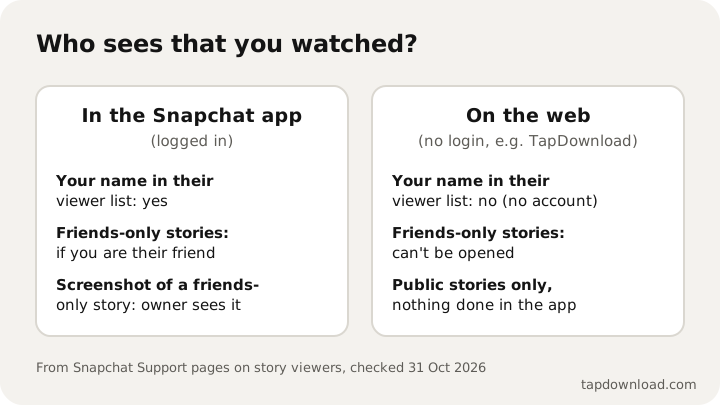
The rest of this guide explains each line, using Snapchat's own help pages (checked on 31 October 2026). Where Snapchat doesn't document something, we say so instead of guessing.
What a story's owner can see
On a friends-only story (My Story)
Snapchat's help center explains how to see who viewed your story: open My Account, tap My Story, and swipe up. You'll see the names of up to 200 Snapchatters who viewed it. After 200 views you see a number, but no more names. The same help page adds: "You can also see if a screenshot was taken."
So on a normal story shared with friends, the owner can see that you watched it, and can see if you took a screenshot.
On a public story
Public profiles post public stories. Snapchat's help page for those says the owner taps their public story, swipes up to see Insights and Replies, and "the friends, followers, and other Snapchatters who viewed your Story are listed under Viewers". In other words, anyone watching inside the app while logged in can appear, not only friends.
That help page doesn't say anything about screenshots on public stories. We won't claim either way. If you're the creator, the safe assumption is that anyone can screenshot a public story, because Snapchat's privacy page says plainly: "anyone can take a screenshot or record a Story!"
Does Snapchat notify when you screenshot a story?
For stories shared with friends, yes: the owner sees it in their viewer list, next to the people who watched. Snapchat's help page describes it in the viewer list, where the owner checks their views.
What about snaps and chats?
Snaps and chat messages sent to you are the strictest case. Snapchat's privacy page says "recipients can always take a screenshot". It doesn't block you. But the sender is told: a screenshot shows up in the conversation and in their chat list.
What is the screenshot symbol on Snapchat?
Inside a chat, a line of text says a screenshot was taken. If you see an icon you don't recognise in your chat list, open the chat: the text there says what happened.
How to see who screenshotted your Snapchat story
- Open My Account (tap your Bitmoji or story icon at the top).
- Tap My Story, or your public story if you have a public profile.
- Swipe up on a snap to see the viewer list. On a public story this opens Insights and Replies.
- Look through the viewers. On a friends-only story, Snapchat says the list also shows whether a screenshot was taken.
How to tell who screenshotted your public Snapchat story
Open your public story, swipe up to Insights and Replies, and look under Viewers. That list shows the friends, followers and other Snapchatters who watched. Snapchat's help page for public stories stops there: it doesn't describe a screenshot marker for public stories, so if you don't see one, that doesn't prove nobody took a screenshot. So the list shows who watched, but may not show who took a screenshot.
Why can't I see who screenshotted my Snapchat story?
- More than 200 people viewed it. Snapchat only names the first 200 viewers. After that you get a count, so later viewers, and their screenshots, don't appear by name.
- It's a public story. Snapchat's help page for public story viewers doesn't describe screenshot indicators, so don't rely on seeing them there.
- The story expired. Viewer lists are something you check while the story is up. Snapchat's help pages don't promise they are kept afterwards.
- They didn't use the app. Someone who watched a public story on the web without logging in has no account to list, so neither their view nor anything they saved shows up.
How to screenshot on Snapchat, and who gets told
Taking a screenshot on Snapchat works like anywhere else on your phone. On an iPhone, press the side button and the volume-up button together (or the Home button and side button on older models). On most Android phones, press power and volume-down together. Snapchat doesn't block it. What changes is who is told:
| What you screenshot | Who is told |
|---|---|
| A photo or video snap someone sent you | The sender |
| A chat conversation | The other person, in the chat |
| A friend's story | The owner, in their viewer list |
| Your own snaps, story or Memories | Nobody, it's yours |
| A public story or Spotlight video | Not documented by Snapchat; assume the creator may see it |
Snapchat screenshots of pics and photos
People often ask whether screenshotting a picture is treated differently from a video. It isn't. A photo snap someone sent you notifies them when you screenshot it, just like a video. If the photo was sent with no time limit, you can use Save in Chat instead, which is visible but honest, and keeps the picture in your conversation.
On iPhone vs Android
The rules are the same on both. Searches like "how to screenshot Snapchat without them knowing on iPhone" usually lead to tips that rely on a quirk of one phone or one app version. They come and go, and none of them is reliable. On any phone, if you screenshot a private snap, the safe assumption is that the sender will know.
Does Snapchat notify screen recordings?
Snapchat's help pages don't spell out how screen recordings are handled. Snapchat's help pages don't say, and we haven't tested it ourselves. Detection depends on the phone and app version, and we haven't been able to verify it ourselves. Our advice is simple: if you're screen recording someone's private snap, assume they'll know.
Can you screenshot on Snapchat without them knowing?
Not in the app. Screenshots of a snap or chat send the sender a notice, and screenshots of a friends-only story show in the owner's viewer list. For private snaps, chats and friends-only stories, the notice exists so that people can trust who keeps what they send. The tricks you'll read about online, such as turning on airplane mode, using a second phone or mirroring your screen, are unreliable, change with every app update, and work against the person who trusted you with the snap. We don't publish them.
There are two honest routes:
- Ask. If you want to keep something a friend sent, ask them to send it on loop (so you can Save in Chat) or to send you the file. They have the original, at better quality than a screenshot.
- For public content, use the public page. Public stories, highlights and Spotlight videos are on snapchat.com for everyone. Saving them from their link with TapDownload doesn't involve the app at all, so no screenshot is recorded. Still, save your own snaps, or ask the person who made them first, especially before you repost anything.
Can people see if you screenshot on Snapchat Web?
Snapchat Web (web.snapchat.com) lets you chat from a computer. When Snap launched it in 2022, it said the web version would hide snaps when you click to another window and would prevent screenshots. Snapchat doesn't document whether a screenshot attempt on the web sends a notice, so treat private chats on the web the same as on your phone.
Can you view a Snapchat story without them knowing?
In the app, no: watching while logged in puts your name in their viewer list, whether you're a friend or not. Public stories are the exception, because they can be watched on the web without an account:
- Type the creator's public @username into the box at the bottom of this page.
- TapDownload opens their public profile without logging in and shows the story, highlights and Spotlight videos.
- Tap any snap to watch it.
Because no Snapchat account is attached, your name can't appear in their list of viewers. What we can't tell you is whether Snapchat counts a logged-out web visit in its total view number; we can't see Snapchat's counters, so we won't promise either way. This only works for public profiles. A friends-only story can't be opened from the web by anyone.
I accidentally screenshotted a Snapchat story. What now?
There's no way to undo it. Deleting the screenshot from your phone doesn't remove the record on their side. If it was a mistake, the simplest fix is to send a quick message saying so, and delete the picture. Most people understand, and it's better than them wondering why.
If you're the creator: what to expect
- Anything public can be kept. Snapchat's privacy page says anyone can screenshot or record a story, and public stories are on the web for anyone to watch. Post publicly only what you're fine with being saved.
- Your viewer list isn't complete. It names up to 200 people, and it can't name people who watched on the web without logging in.
- Use friends-only stories for private moments. They never appear on the public web, and screenshots show in your viewer list.
- Your Spotlight posts are public too. Snapchat says Spotlight submissions are public and stay on its servers until you delete them.
Sources
- Wikipedia: Snapchat (screenshot notifications)
- Snapchat Support: How can I see who viewed My Story on Snapchat?
- Snapchat Support: How do I see who viewed and replied to my public Story?
- Snap Privacy Center: Privacy by Product
- Snapchat Support: How to Save a Snap or Friend's Story in Chat
- TechCrunch: Snap launches Snapchat for Web (18 July 2022)
- TapDownload checks of public profiles on snapchat.com, 29 October 2026