How to View Old Snapchat Stories
TapDownload is a free website that saves public Snapchat Spotlight videos, stories and highlights from their link. It is not affiliated with Snap Inc.
Your own old stories are in Memories if you saved them or turned on auto-save. Someone else's old story is visible only if they added it to a highlight, or if it is still on their public profile. In TapDownload's tests on 29 October 2026, public profiles on snapchat.com still showed story snaps up to about seven days old.
The short answer
Snapchat stories are built to disappear, so "old stories" only exist where someone chose to keep them. There are three places to look:
- Memories, for your own stories that were saved by hand or by auto-save.
- Highlights on a public profile, for stories a creator pinned so they stay.
- A public profile's current story, which can hold snaps older than a day.
If none of those applies, the story is gone. Snapchat's privacy page says most stories are set to delete after 24 hours "unless you change the settings, save the Story to your Public Profile, or you or a Friend saves it in Chat." Once a story is deleted, there's no hidden archive you can open. Everything in this guide was checked against Snapchat's help pages on 31 October 2026.
How to look at old Snapchat stories: which case are you in?
Start with whose story it is. The answer decides where to look, and whether there's anything to find at all.
| Whose story | Where to look | Can you still see it? |
|---|---|---|
| Yours, saved or auto-saved | Memories | Yes, until you delete it |
| Yours, never saved | Nowhere | No, it was deleted when it expired |
| A friend's, friends-only | Your Stories feed, while it's up | No, once it expires |
| A public creator's | Their public profile: story and highlights | Often for several days, and highlights stay |
How to find your own old Snapchat stories
If you saved a story, or had auto-save turned on when you posted it, it's in Memories:
- On the camera screen, swipe up to open Memories.
- Scroll back to the date you posted. Saved stories appear alongside your saved snaps.
- Tap a story to play it, or press and hold it for options such as Export.
Memories can be searched, which helps when you have years of saved snaps. If you're looking at old stories on a new phone, wait until Memories finishes loading: Snapchat backs Memories up to your account, so they come back when you log in on another device, as long as the backup was complete.
How to see your old stories on Snapchat if you never saved them
Unfortunately, you can't. An unsaved story is deleted when it expires. Snapchat's help pages describe no way to restore it, and Snapchat's own data export only contains what your account still holds, such as your Memories. If you think a story might still be saved somewhere, check Memories on every device you've used, and check your phone's gallery in case your Save Button was set to the camera roll.
Make sure future stories are kept
Turn on auto-save once and every story you post from then on is copied to Memories:
- In My Account, tap the gear icon to open Settings.
- Under "App & Privacy", tap My App, then Memories.
- Turn on Auto-Save My Story Snaps.
Then check Backup Progress on the same screen now and then. Snapchat warns that Memories which weren't backed up can't be recovered if you lose your phone or log out.
How to view old Snapchat stories of friends
The honest answer is short: once a friend's story has expired, you can't view it. Snapchat doesn't keep an archive of other people's stories for you, and no setting reveals them.
What you can do instead:
- Watch while it's up. Friends' stories stay in your Stories feed until they expire, usually 24 hours.
- Ask your friend. If they saved their story, it's in their Memories, and they can send it to you.
- Check their public profile. If your friend has a public profile, they may have pinned the story to a highlight, which stays until they remove it.
How far back can you see a public profile's story?
Public profiles work differently from friends-only stories. Creators, businesses and anyone with a public profile post stories that appear on snapchat.com, where anyone can watch them without logging in. Snapchat's wording is that "most" stories delete after 24 hours, unless the owner changes the settings or saves the story to their Public Profile. That is why public profiles don't always follow the one-day rule.
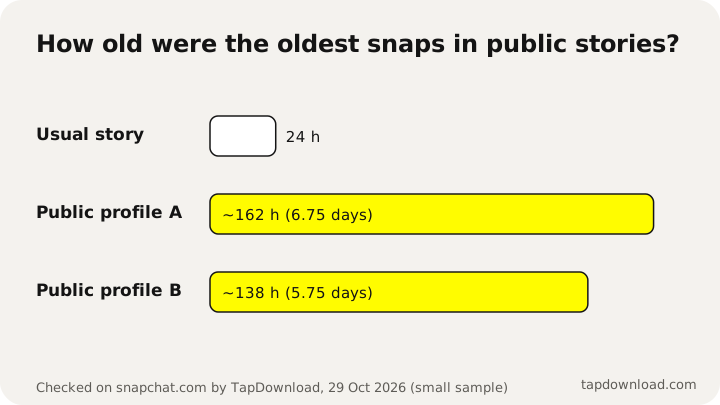
We looked at this directly. On 29 October 2026 TapDownload opened public profiles on snapchat.com and checked the age of every snap in their current story:
| What we checked | What we found |
|---|---|
| Oldest snap still in a public story | About 162 hours old (6.75 days) |
| Another profile's oldest snap | About 138 hours old (5.75 days) |
| Highlights | Stay on the profile until the owner removes them |
| Friends-only stories | Never shown on snapchat.com |
This is a small sample from one day, not a rule Snapchat publishes, and it can change. But it means that a creator's story from earlier in the week may still be watchable.
Snapchat old story viewer: how to see a public profile's older snaps
- Type the creator's public @username into the box at the bottom of this page, or paste their profile link.
- Tap Download. TapDownload shows their current story, their highlights and their Spotlight videos in separate tabs.
- Tap any snap to watch it. Each snap is labelled, so you can see what's still there and save any of it.
You don't log in to Snapchat to do this, so your account can't appear in their list of viewers. It only works for public profiles. The Snapchat story downloader page has the same tool with more detail on which links work.
Highlights: the stories that don't expire
If a creator wants a story to last, they add it to a highlight on their public profile. Highlights sit on the profile like albums and stay until the creator deletes them. For anyone looking for old stories from a public account, highlights are the main place to look.
In TapDownload, highlights get their own tab. Highlight photos save at full size, which measured 1242 x 2208 or 1320 x 2346 pixels in our tests on 30 October 2026, and highlight videos come with 128 kbps sound rather than the 48 kbps preview the page plays.
How long do Snapchat stories last?
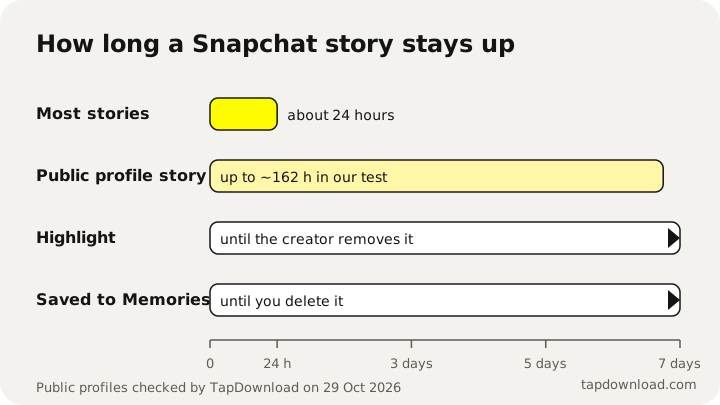
Snapchat says most stories delete after 24 hours unless the owner changes the settings. Saved stories stay in Memories until you delete them, highlights stay until the creator removes them, and in TapDownload's checks on 29 October 2026 public profiles showed story snaps up to about seven days old.
| Kind of story | How long it stays |
|---|---|
| Your story, unsaved | Usually 24 hours, then deleted |
| Your story, saved or auto-saved | In Memories until you delete it |
| A friend's story | Usually 24 hours in your feed |
| A public profile's story | Often longer; up to about 7 days in our tests |
| A highlight | Until the creator removes it |
Saved Memories also have a storage rule now. Since Snapchat's 2025 change, accounts get 5GB of Memories storage for free. Snapchat says it won't automatically delete Memories, but from January 2027 some older Memories over that limit will be archived. Our Memories guide explains who is affected and how to download everything first.
Finding old stories on a new phone
A new phone is when most people discover that old stories are missing. What comes back depends on where they were saved:
- Stories in Memories come back when you log in to Snapchat on the new phone, because Memories are backed up to your account. That only works if the backup was complete. Snapchat's help pages say to check that Backup Progress says "Complete" before you log out or switch devices, and that Memories which weren't backed up can't be recovered.
- Stories saved only to your camera roll are ordinary files on the old phone. They move to the new one with your phone's own backup (iCloud Photos on iPhone, Google Photos or your phone maker's backup on Android), not with Snapchat.
- Stories you never saved don't come back, on any phone.
If you're about to switch, open Settings, My App, Memories on the old phone first, connect to Wi-Fi, and wait for Backup Progress to finish.
Your old stories in Snapchat's data download
Snapchat has a free export called My Data. At accounts.snapchat.com, or in the app under Settings, My Data, you can turn on Export your Memories and request a download. Snapchat emails a link to a zip file. Open the index.html file inside on a computer and the Memories page lets you download your saved snaps and stories in one go.
It's the best way to keep a permanent copy of old stories outside the app, and it's worth doing now that Memories storage has a free limit. It can't include stories that were never saved, because Snapchat no longer has them. Step-by-step instructions are in how to download all your Snapchat Memories.
Why Snapchat makes old stories hard to find
Stories arrived on Snapchat in October 2013 as a recap of the last 24 hours. Each snap added to a story disappeared after a day to make room for the next. That idea, sharing something without it staying online forever, is still the reason the app works the way it does today.
So the missing "old stories" button isn't an oversight. Snapchat lets you keep your own stories (save them, auto-save them, export them), lets creators keep theirs public with highlights, and leaves everyone else's stories to expire. Any tool that claims to get around that for private stories is either misleading you or trying to get your login.
How to keep stories so you can find them later
- Turn on Auto-Save My Story Snaps so every story you post goes to Memories.
- Set the Save Button to Memories & Camera Roll if you want a copy outside Snapchat too.
- Download your Memories once a year with Snapchat's My Data export, and keep the files on a computer or cloud drive.
- For a creator's public story you love, save it while it's up: type their @username into TapDownload and save the whole story as a ZIP. Keep it for yourself, and ask before reposting.
Sources
- Snap Privacy Center: Privacy by Product
- Snapchat Support: How do I get My Story Snaps to auto-save to Memories?
- Snapchat Support: How do I make sure my Memories are backed up?
- Snapchat Support: How can I see who viewed My Story on Snapchat?
- Snapchat Support: How do I manage my Memories storage?
- Snapchat Support: How do I download my data from Snapchat?
- PetaPixel: Snapchat debuts Stories (3 October 2013)
- TechCrunch: Snapchat Memories is a searchable replacement for your camera roll (6 July 2016)
- TapDownload checks of public profiles on snapchat.com, 29 and 30 October 2026